Upload one photo. Choosin Texas Emo AI makes a 12s rooftop cover video at 720p with original music for 2 credits. Song not included.
2 credits · 720p · 12s
Sample video
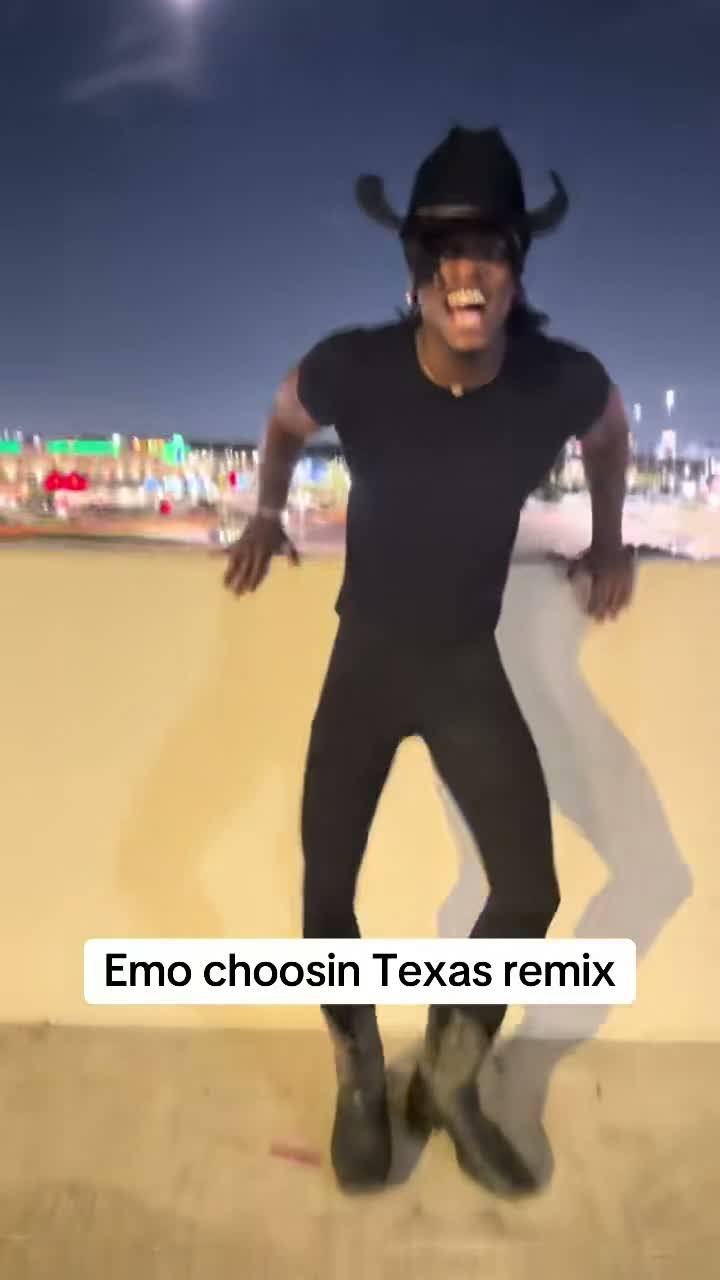
A rooftop emo cover trend clip: the squat bounce off the wall, the rock horns close to the camera, and the drop to one knee at the end. Your video is made from your own photo with the prompts below.
Sample video
Demo: TikTok @kobbapot (original emo Choosin' Texas cover). This demo is a real trend clip, not a video this site generated.
18+ only. Your generated video uses an original emo-rock instrumental only. Song not included: there is no lip-sync to the original performance, and the creator's voice is not used. The demo above contains the real performance and song; it only shows the trend. Choosin' Texas is the name of the trend only. This site is not affiliated with the song's owners; the cover in the demo is the creator's own performance, and no rights are granted.
Make your video
2 credits are charged when you generate. Failed video jobs are refunded.
Choose your photo first. Sign in when you generate. Credit packs
Where the Choosin' Texas emo trend came from
A country hit gets covered in many styles, and emo and rock takes circulated from June 2026. A rooftop emo cover posted on 29 September 2026 reached 13.2M views, and copies and duets followed, each singer putting the same pained delivery over a parking-garage roof at night.
The look: you lean back against a waist-high wall under city lights and a moon, face half-closed in feeling, then work through the routine — squat bounce, rock horns, pleading clasped hands, head thrown back, crossed arms, lunge, and a drop to one knee. Your generated clip keeps that staging with original music only; the song is not included.
How to make it in 3 steps
1. Upload your photo
One photo of yourself, waist-up, facing the camera, in good light. Your face, hair, and outfit stay exactly as in the photo.
2. Add one photo, solo only
There is no mode picker: one photo, one person, solo only. No cowboy hat or boots are added.
3. Generate · 2 credits
Credits are charged when you generate. Wan 3.0 (wan3.0-video) makes a 12s, 720p clip with original music. Resolution is always sent as 720P.
What it looks like
You stand on the flat roof of a parking garage at night, leaning back against a waist-high concrete wall, one knee bent, city lights and a bright moon behind you. Your face, hair, and clothes stay exactly as in your photo, and nothing western is added.
The video pushes off the wall in a low squat bounce, steps close for rock horns, pulls back with clasped pleading hands, presses your back to the wall with your head thrown back, crosses your arms in an X with a hand to the heart, lunges forward, and drops to one knee, head bowed, as the camera holds close.
Which photo works best
Use a sharp waist-up photo, facing the camera, head and shoulders clear, in good light. The prompt keeps your face, hair, outfit, colors, and accessories exactly, and only changes the scene around you.
Any background works, because the scene gets replaced with the parking-garage roof. Use your own photo only, no celebrities, and you must be 18 or older.
Prompts
Also on the prompts page. Solo is the only mode, with one pair of prompts.
Solo · Internal first-frame prompt
Use the uploaded photo as the base. Keep the person's face, hair, skin tone, body shape, outfit, colors, fabrics, shoes, and accessories exactly as in the photo. Do not add a cowboy hat, boots, or any western clothing the photo does not show. Do not swap or blend in another person's features, and do not make the person look like a celebrity. Place the person on the flat roof of a parking garage at night, leaning back against a waist-high concrete wall, one knee bent, with a pained emo expression, eyes half closed and mouth open mid-line. Behind the wall, spread city lights, lit windows, and a bright moon in a dark sky. A few parked cars and a stairwell bulkhead sit far behind, out of focus. Waist-up framing with the wall cutting across the lower third, handheld camera feel, 35mm lens, cool night grade with warm window light, photorealistic, not CGI. Vertical 9:16. Exactly one person, no text, no logos.
Solo · Video · 12s
A single continuous take with no cuts, shot handheld on a parking garage roof at night. Keep the person's face, hair, outfit, and body exactly as in the still image. The person pushes off the waist-high wall in a low squat bounce, then steps close to the camera and throws both hands up in rock horns, then pulls back with hands clasped together in a pleading gesture. They turn, press their back flat against the wall, and throw their head back with eyes closed, then cross both arms in an X over the chest and press one hand to the heart. They lunge forward toward the lens, then drop to one knee, head bowed, as the camera holds close. City lights and the moon stay behind the wall the whole time, and the framing stays waist-up or closer. Audio: an original emo-rock instrumental only, driving guitars and drums with no singing, no lyrics, and no known song. No dialogue, no text, no logos.
Pricing
Choosin' Texas Emo is 2 credits for a 720p, 12 second video with original music. Credits do not expire. There is no subscription.
$9.99
Try
2 credits
$19.99
Creator
6 credits
$49.99
Studio
18 credits
All purchases are final and non-refundable. If a paid Choosin' Texas Emo video fails, or is still running after 10 minutes, the 2 credits charged for that video are returned automatically. A finished video is not refunded. For billing errors such as a duplicate charge, email support@knightcatai.com.
No. The generated video uses an original emo-rock instrumental only: the song is not included, and there is no lip-sync to the original performance. Choosin' Texas is the name of the trend only. This site is not affiliated with the song's owners; the cover in the demo is the creator's own performance, and no rights are granted.
How do I make the Choosin Texas Emo video?+
Upload one photo of yourself, solo only. Click Generate to spend 2 credits and start the 12 second 720p rooftop cover video with original music. The first frame is prepared during generation.
Where do I get the prompt?+
You do not need to write one. The page uses fixed prompts for the internal first frame and the video. You can read both prompts in the Prompts section below or on the prompts page.
Is the demo a video this site made?+
No. The demo is a real trend clip of the original rooftop cover. It contains the real performance and the real song, and it only shows the trend. Your generated video uses original music instead, with the song not included.
What photo works best?+
Use a sharp waist-up photo, facing the camera, head and shoulders clear, in good light. Your face, hair, and outfit are kept exactly as in the photo. No cowboy hat or boots are added, and any background works because it gets replaced with the rooftop.
How long is the Choosin Texas Emo video and how much does it cost?+
Every Choosin' Texas Emo video is 12 seconds at 720p, with an original emo-rock instrumental. It costs 2 credits when you click Generate. Packs: $9.99 for 2 credits, $19.99 for 6 credits, and $49.99 for 18 credits.
Do I need to be 18?+
Yes. Photos must be you or adults who agreed. Use photos you own or have permission to use. No celebrity lookalikes.
More pet video templates
Other Knight Cat AI tools that turn pet photos into short videos with sound. Some templates also use your photo.