How to Take the Perfect Photo for a Knight Cat Video
One photo decides whether your knight cat looks like your cat. Light, angle, background and the mistakes that ruin results.
The AI does the armor, the sword and the storm. Your job is the photo. And honestly, the photo decides most of the result. A sharp, well-lit picture gives you a knight that is obviously your cat. A dark, blurry one gives you a knight that looks like some cat.
Good news: you don't need a good camera or any skill. You need a phone, daylight and two minutes. Here's what matters for this generator.
The short version
- One pet per photo
- Whole body in frame
- Daylight, ideally near a window
- Eyes visible
- Plain background
- No filters, no costumes
If you only read this far, you'll be fine. The rest explains why, and how to deal with pets that won't cooperate.
Why the photo matters so much
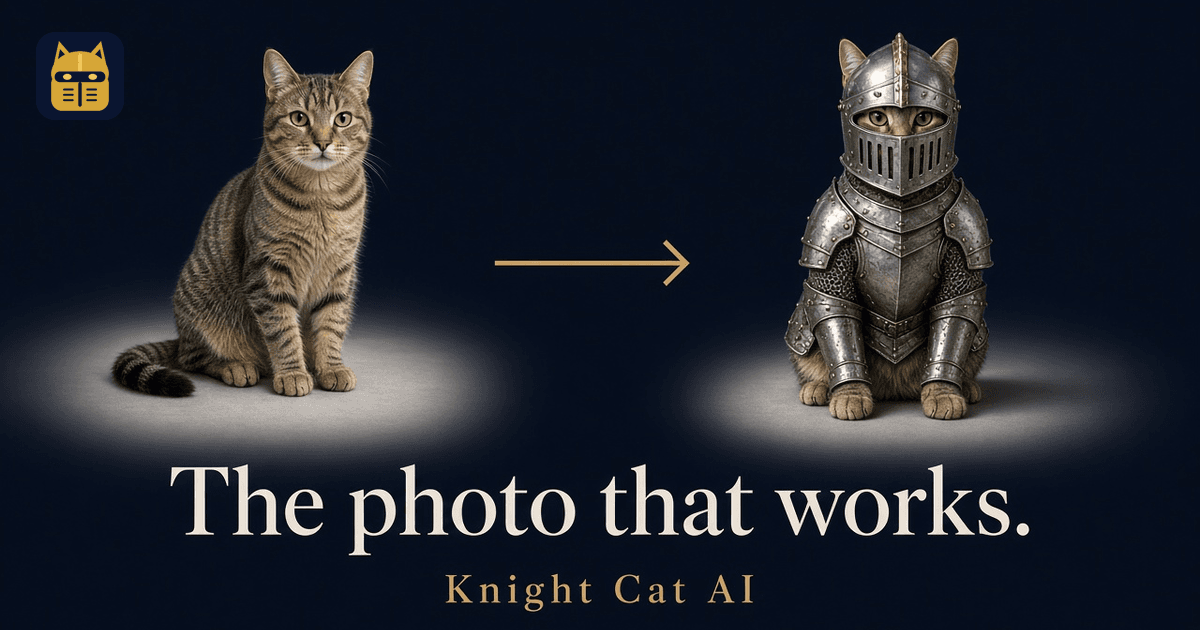
The model has to work out three things from your picture: what breed and shape your pet is, what its fur colours and markings look like, and what its face looks like. Then it has to keep all of that while redrawing the pet standing up in armor.
Anything it can't see, it guesses. If the tail's out of frame, it invents a tail. If the face is in shadow, it invents a face. That's where you get the "nice knight, not my cat" problem.
Light: the biggest single fix
Shoot in daylight. Indoor lamp light at night makes fur look orange and flat and adds noise, and the model reads noise as texture.
Best setup: put your pet near a window, with the light coming from the side or from behind you. Not behind the pet — that turns them into a silhouette. Overcast days are perfect because the light is soft and even.
Avoid flash. It gives cats glowing eyes and flattens fur, and the model often carries those weird eyes straight into the knight.
Black cats and dark dogs: give them more light than feels necessary. Dark fur hides the face shape, and the model needs that to keep the likeness. A bright window plus a white wall nearby to bounce light works well.
Framing: whole body, eyes visible
Get the whole pet in the frame, ears to tail. The knight is a full-body shot, so the model needs to know the body shape, leg length and tail.
Get down to their level. Shooting from standing height makes a cat look like a small furry circle. Crouch or put the phone on the floor. This also helps the eyes show up clearly, which matters more than anything for likeness.
Don't crop tight. Leave a little space around the pet. You're not composing the final picture; you're giving the AI good reference.
Sitting or standing is better than curled up asleep. A sleeping loaf of cat is adorable but tells the model very little about the legs.
Background: boring is good
A plain floor, a wall, a sofa, the grass. The prompt replaces the background with a misty moor anyway, so whatever's behind your pet doesn't need to look nice — it just shouldn't confuse things.
Things that do confuse it:
- Other pets or people partly in the frame
- Patterned blankets the same colour as the fur
- Mirrors and windows with reflections
- Toys or objects touching the pet
One pet per photo
If you have two cats, take two photos. A photo with both of them often ends up as one knight with features from each. If you want two pets in one video, use one photo for each where the template allows it.
For the "You & your pet" template
You'll upload two photos: yourself first, then your pet.
For your photo:
- Face clearly visible, looking roughly at the camera
- Full or half body
- No sunglasses, hats, or heavy filters
- Decent light, same rules as above
Only use your own face, or the face of an adult who has agreed. No celebrities and no photos of other people's children.
Things that ruin results
These are the ones we see most:
- Beauty filters and AR effects. Even a light filter changes fur colour and eye shape. Use the plain camera.
- Costumes. A cat already wearing a little hat or bandana confuses the model about what's cat and what's clothing.
- Motion blur. Cats move. Take a burst and pick the sharpest frame.
- Screenshots of photos. Low resolution, compression, sometimes UI on top. Use the original file.
- Heavy zoom. Digital zoom on a phone throws away detail. Walk closer instead.
- Very old or tiny photos. Under about 600 pixels on the short side, there's just not enough to work with.
Tricks for pets that won't sit still
- Treat above the phone. Hold a treat just above the lens. You get eyes on camera and a slightly raised head, which reads as "brave".
- A sound. A crinkle, a squeak, their name. You get a second of alert ears.
- Burst mode. Hold the shutter and pick the best frame later.
- Wait for the stretch. After a nap, most cats stand up and stretch. Be ready.
- Two people. One holds attention, one shoots.
Use an old photo?
Sure, if it's sharp. An old sharp photo works, including one of a pet who has passed. If the only photo you have is a bit soft, try it with a free still and see.
Check before you pay
That's the point of the free preview. Upload your photo and look at the watermarked still. Signed-in accounts get 2 of those a day. If it looks like them, generate the video. If not, try another photo before you spend a credit.
The video is animated from that exact still, so look at the still before you spend a credit.
File details
- JPG, PNG, or WEBP
- Up to 10 MB
- Vertical or horizontal both work. The finished video is 9:16
Ready?
Grab your phone, find some daylight and get down to floor level. Then upload the photo and see your pet in armor. The prompts the site sends are on the prompts page. You do not type a prompt.